
Your first game
Wira Bandar PC is a fork of OpenTTD: OpenTTD's code with changes, free software under the GNU GPL v2. About and credits
A new game in Wira Bandar PC starts like one in OpenTTD. This page shows what to choose for a Malaysian or Singaporean setting, and where the new tools are once you’re in.
Start a new game
Section titled “Start a new game”-
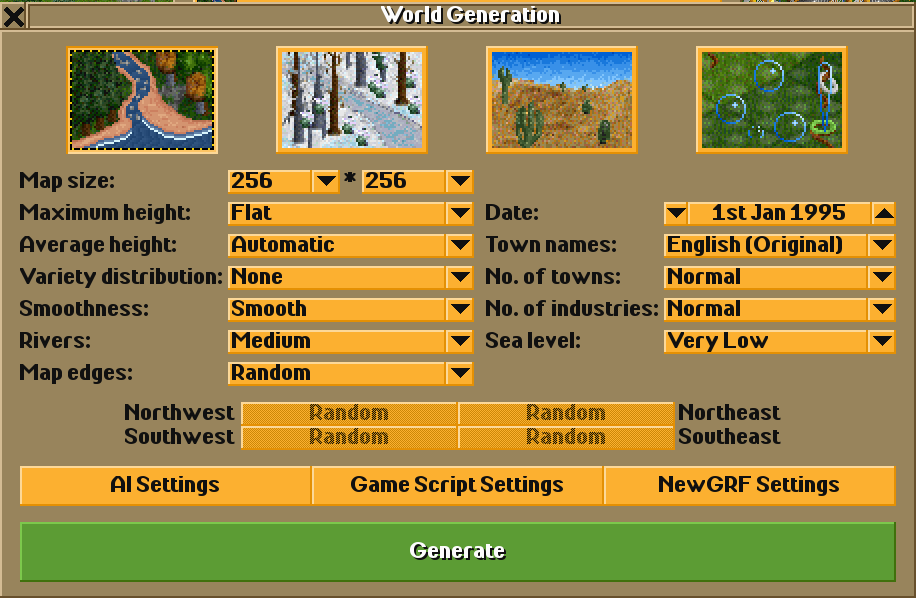
In the main menu, click New Game. The World Generation window opens.
-
Pick the climate: the first picture (temperate) or the third (sub-tropical). The Malaysian and Singaporean buildings are built in these two climates. In the sub-arctic and toyland climates, towns build OpenTTD’s buildings.
-
Choose a Map size and No. of towns. States form around the biggest towns, with about one state capital for every six towns, so a map with a dozen towns or more gives you several states.
-
For a region run like Sabah and Sarawak, you need a second land across the sea (or behind a narrow neck of land) with at least two towns: a higher Sea level and Map edges set to water make that likely. See Federal territories and regions.
-
Click Generate.
Which new features are on
Section titled “Which new features are on”In a new game, these are on unless you change them first (Game Options → Advanced → Environment → Towns, in the main menu):
| Feature | Default |
|---|---|
| Town traffic | Normal |
| Air pollution and land value | Normal pollution |
| Town buildings | Malaysian and Singaporean |
| Town budgets and ordinances | On |
| Town councils | On |
| States and elections | On |
| Commuting | On |
| Road vehicles give way at junctions | On |
| City clock with rush hours | Off |
| Staff budget for road vehicles | Off |
Everything you build (traffic lights, zones, city services, lines, bus lanes, tolls) only exists once you build it. The settings reference has every setting.
Where the new tools are
Section titled “Where the new tools are”The main toolbar
Section titled “The main toolbar”
The Towns menu
Section titled “The Towns menu”Click Towns on the main toolbar (the button with the tooltip Open town directory or found town):
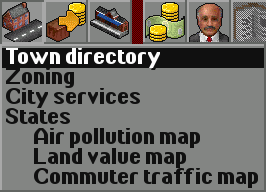
- Zoning (Shift+Z): zones for homes, shops and offices, industry and parks.
- City services (Shift+C): police, fire, clinics, schools, parks and bigger buildings.
- States: the states, their governments and elections.
- Air pollution map, Land value map: map views of the air and the land.
- Commuter traffic map: where commuters drive.
The Build roads menu and the road toolbar
Section titled “The Build roads menu and the road toolbar”Click Build roads on the main toolbar. Next to Road construction the menu has two new road types: Bus-only road construction and Expressway construction (see bus priority and expressways and tolls).
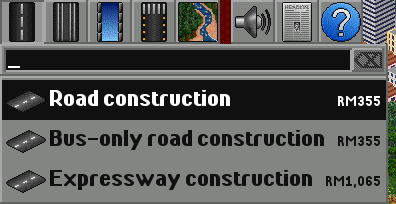
The Road Construction toolbar has five new buttons, after the road stop buttons:

| Button | Key | What it does |
|---|---|---|
| Traffic lights | S | Build traffic lights at a junction, or click lights to change their timings |
| Traffic overlay | O | Colour roads by traffic |
| Stop charger | G | A fast charger over a bus stop for electric buses |
| Bus priority | Y | Bus lanes, give-way markings, bus signals, busways and BRT stations |
| Tolls | K | Toll plazas, free-flow gantries and toll prices |
The town window
Section titled “The town window”Click a town’s name on the map to open its window. Wira Bandar PC adds lines for the town’s council, state, homes and jobs, happiness and city services, traffic, commuters, the air and land value, and three buttons:
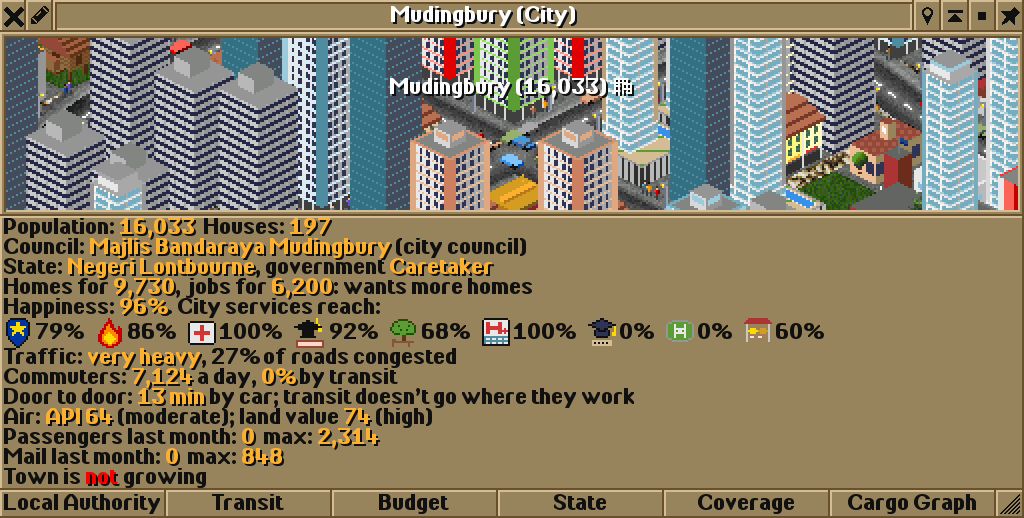
- Transit: the town’s transit authority: its budget, tenders, contracts and passes.
- Budget: the town’s taxes, spending and ordinances, and its council.
- State: the town’s state, government and elections.
Stations and vehicles
Section titled “Stations and vehicles”- Station windows have Departures (a departures board), and the Interchange and Transport hub buttons (interchanges and hubs); railway stations also have Screen doors (metro and rail).
- Vehicles that share their orders form a line with a number, name and colour.
A good first goal
Section titled “A good first goal”Pick a town of a few thousand people and give it a bus network: the tutorial Your first city bus network goes through it step by step.
Wira Bandar PC is a fork of OpenTTD. It is OpenTTD's code with changes, not a game made from scratch. OpenTTD is made by the OpenTTD team and contributors and is free software under theGNU General Public License version 2; Wira Bandar PC keeps that licence, OpenTTD's credits and copyright notices.Source code ·OpenTTD ·About and credits
Wira Bandar PC is not made or supported by the OpenTTD team, so please don't report its bugs to OpenTTD (see FAQ and troubleshooting).