
Rush hours and on-demand lines
Wira Bandar PC is a fork of OpenTTD: OpenTTD's code with changes, free software under the GNU GPL v2. About and credits
With the city clock on, towns live through a day: twice as many people look for a bus in the morning rush hour, the roads fill up, and at night the streets are quiet. Your lines can follow the day: park some vehicles in the depot between the rush hours to save running costs, or run only in the rush hours. An on-demand line goes where people are waiting instead of taking its stops in order.
Turn on the city clock
Section titled “Turn on the city clock”SettingCity clock with rush hours
Main toolbar: Options and settings (the gear) → Game options → Advanced tab → Environment → Towns. Or type its name in the Filter box.
Choices: Off, A day per year, A day per month (fast). Default: Off. Choose Off for the game as in OpenTTD.
You can switch it on or off at any time, also during a game. The time shows next to the date in the status bar at the bottom of the screen, in orange during the rush hours:

How the day goes
Section titled “How the day goes”| Time | Part of the day | Passengers from houses | Town traffic |
|---|---|---|---|
| 00:00-06:00 | night | 30% | two levels quieter |
| 06:00-09:00 | morning rush hour | 200% | one level busier |
| 09:00-16:00 | day | 100% | as the town makes it |
| 16:00-19:00 | evening rush hour | 180% | one level busier |
| 19:00-24:00 | evening | 60% | one level quieter |
- Over a whole day, houses send about as many passengers as without the clock (about 97%), but bunched into the rush hours, which makes them harder to carry with the same buses.
- Traffic only changes on roads that have some: a quiet road stays quiet. The change applies to speeds, routes, the traffic overlay, street life, the Land Area Information and smart traffic lights. The level the town keeps for each road stays its level for the whole day, so the town’s own figures don’t swing with the clock.
- Peak bus lanes are bus lanes in the rush hours only and open to all the rest of the day (see bus priority).
A day per year keeps pace with the vehicles: a rush hour lasts about 45 game days, and a bus line’s round trip takes a city half-hour or so. A day per month (fast) is nicer to watch, but a rush hour then lasts only about 4 days, shorter than most round trips, so few lines can park vehicles between them.
Park vehicles between the rush hours
Section titled “Park vehicles between the rush hours”- Open the line’s window (see lines): in a vehicle’s Timetable window click Line, or in a vehicle list set Group by to Lines (shared orders) and click the line.
- Click the Off-peak: all run dropdown.
- Choose how many vehicles keep running between the rush hours, or Rush hours only for a peak shuttle.
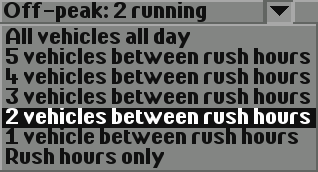
When a rush hour ends, the line sends the vehicles it doesn’t keep, emptiest first, to the nearest depot, where they stop. A vehicle waiting there costs no running costs, and the game doesn’t send the … is waiting in depot news for it. When the next rush hour starts they all set out again, and any still on their way to the depot turn back. The time spent waiting doesn’t count as travel time, so the line’s round trip stays right.
A line only parks vehicles when the stretch until the next rush hour lasts at least two of its round trips; otherwise they would spend it driving to the depot and back. The line window’s Service: line tells you what happens:
- Service: all vehicles all day
- Service: 2 vehicles between rush hours, 4 waiting in a depot now
- Service: rush hours only, … waiting in a depot now
- Service: all vehicles all day: the time between rush hours is too short for its round trip
- Service: all vehicles all day (the city clock is off)
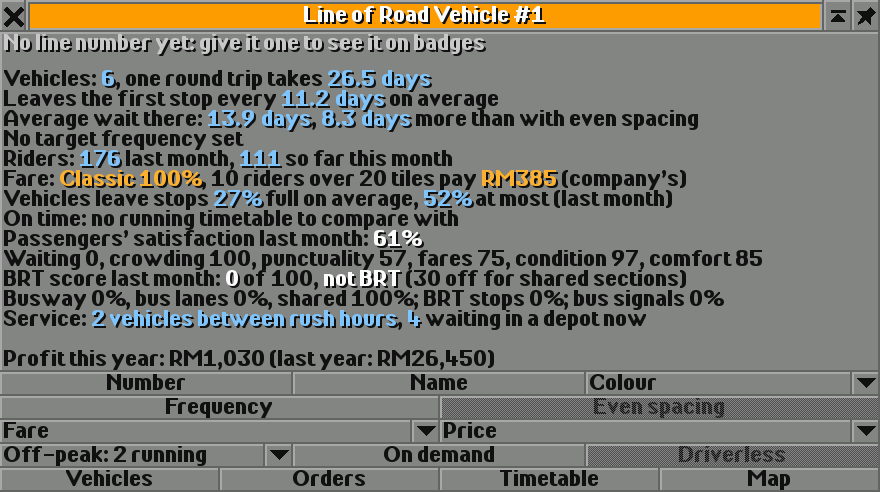
If you renew or replace a waiting vehicle, the new one waits too. A vehicle you start again yourself simply runs with the line until the next rush hour ends.
In a test with six double-deckers on one line through a town of 10,400 people, a day per year:
| Off-peak service | Running costs for the year | Riders in the year | Satisfaction |
|---|---|---|---|
| All vehicles all day | 100% | 2,447 | 55% |
| 2 vehicles between rush hours | 54% | 2,575 | 69% |
| Rush hours only | 29% | 754 | 49% |
Keeping two buses between the peaks almost halved the running costs and carried more people, because fewer buses bunched together. With a day per month, the same line kept all six running: the stretches between the rush hours were too short for its 28-day round trip.
Run a line on demand
Section titled “Run a line on demand”- Open the line’s window.
- Click On demand (tooltip Run the line on demand, like a demand-responsive van service). The button stays pressed; click it again to go back to taking the stops in order.
After each stop, a vehicle of an on-demand line heads for the stop of its line that has the most to do:
- where passengers on board get off (these count double),
- where the most passengers it has room for are waiting, less what the line’s other vehicles already on their way there can take,
- or that has waited longest for a pickup,
- with nearer stops first.
With cargo distribution on, the game knows from each stop’s planned passenger flows where riders get off; without it, everyone gets off at the next stop. Stops a vehicle passes on the way are not added to its orders, and Even spacing doesn’t hold on-demand vehicles. The line window shows Service: on demand, … and the line map , on demand. On-demand lines can park vehicles between the rush hours too.
It suits a few small vehicles serving a quiet area, like a demand-responsive van service. In tests with stops round a town centre, three buses on demand carried 9,177 riders in a year against 7,968 on a fixed loop (satisfaction 72% against 52%), and in a smaller town two buses carried 5,531 against 3,503: on a fixed loop the buses bunch, on demand they spread out.
- Start with a day per year. Use a day per month only for short lines, or to watch the day go by.
- Keep enough vehicles between the rush hours that people don’t wait too long: waiting is the biggest part of passenger satisfaction.
- A Rush hours only shuttle can add capacity on a busy corridor in the peaks, beside a line that runs all day.
- Peak bus lanes cost other traffic nothing outside the rush hours, which makes them a good choice with the clock on.
Switching it off
Section titled “Switching it off”Set City clock with rush hours to Off (the box above). Every hour is then like the day, as in OpenTTD. Vehicles waiting for a rush hour set out again, the line window says (the city clock is off), and peak bus lanes go back to helping buses a little all day.
See also
Section titled “See also”- Lines: the line window
- Bus lanes and bus priority: peak bus lanes
- Passenger satisfaction: waiting, crowding and punctuality
- Town traffic and street life: what busier roads do
Wira Bandar PC is a fork of OpenTTD. It is OpenTTD's code with changes, not a game made from scratch. OpenTTD is made by the OpenTTD team and contributors and is free software under theGNU General Public License version 2; Wira Bandar PC keeps that licence, OpenTTD's credits and copyright notices.Source code ·OpenTTD ·About and credits
Wira Bandar PC is not made or supported by the OpenTTD team, so please don't report its bugs to OpenTTD (see FAQ and troubleshooting).