Build a BRT corridor
Wira Bandar PC is a fork of OpenTTD: OpenTTD's code with changes, free software under the GNU GPL v2. About and credits
Bus rapid transit gives buses what trains have: their own track, stations where riders pay before they board, and green lights at junctions. In this tutorial you turn a town’s busiest street into a BRT corridor, run a line on it, and use the line’s BRT score to find what still holds it back.
It follows a real game. In July 2021 Kinningbury, a city of 11,322 people, had no buses and heavy traffic. The first version of the line scored 54 of 100 (basic BRT); after one change it scored 98 (BRT gold).
Before you start
Section titled “Before you start”- A town with a few thousand people or more and a long, straight main street through its centre. Town traffic should be on (it is by default) so the street is busy: see town traffic.
- Money: here the whole corridor with three articulated buses took about two thirds of the RM500,000 the company started with.
- The game’s own city buses earn extra points at BRT stations. The articulated Kenari Bendi 18 used here comes out around 2000; see buses for the others.
- In big towns the houses hide the streets. Ctrl+3 makes houses see-through, as in the pictures here; press it again to bring them back.
1. Pick a busy corridor
Section titled “1. Pick a busy corridor”- Find the town: on the main toolbar click Towns (tooltip Open town directory or found town), choose Town directory and click the town’s name. The main view moves there.
- Open the road toolbar: click Build roads (the road icon; tooltip Build road infrastructure) and choose Road construction, or press Shift+F8.
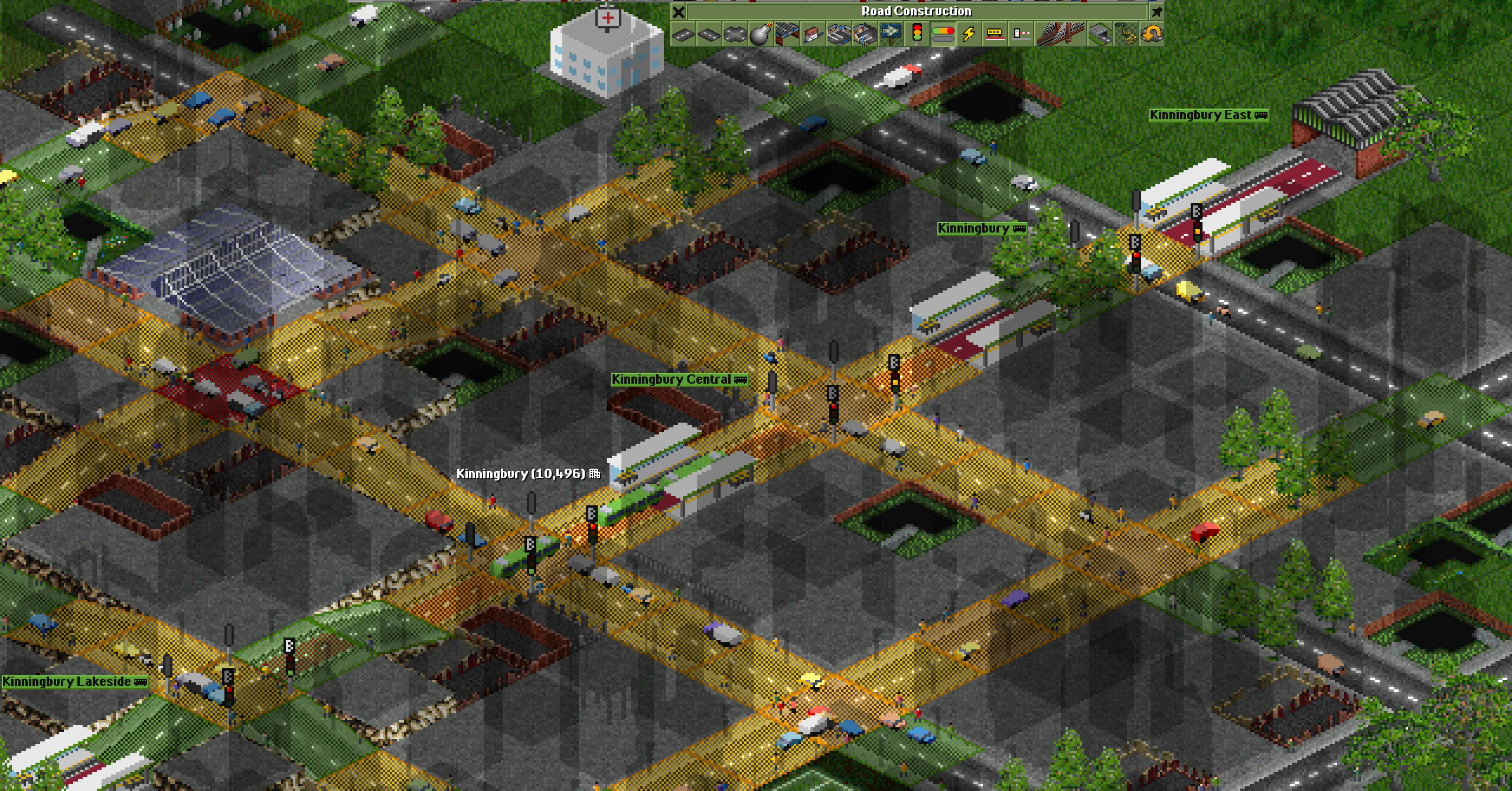
- Press O to show the traffic overlay (see the traffic map).
- Pick a straight main road through the centre that is yellow, orange or red, long enough for three or four stops: 12 to 16 tiles.
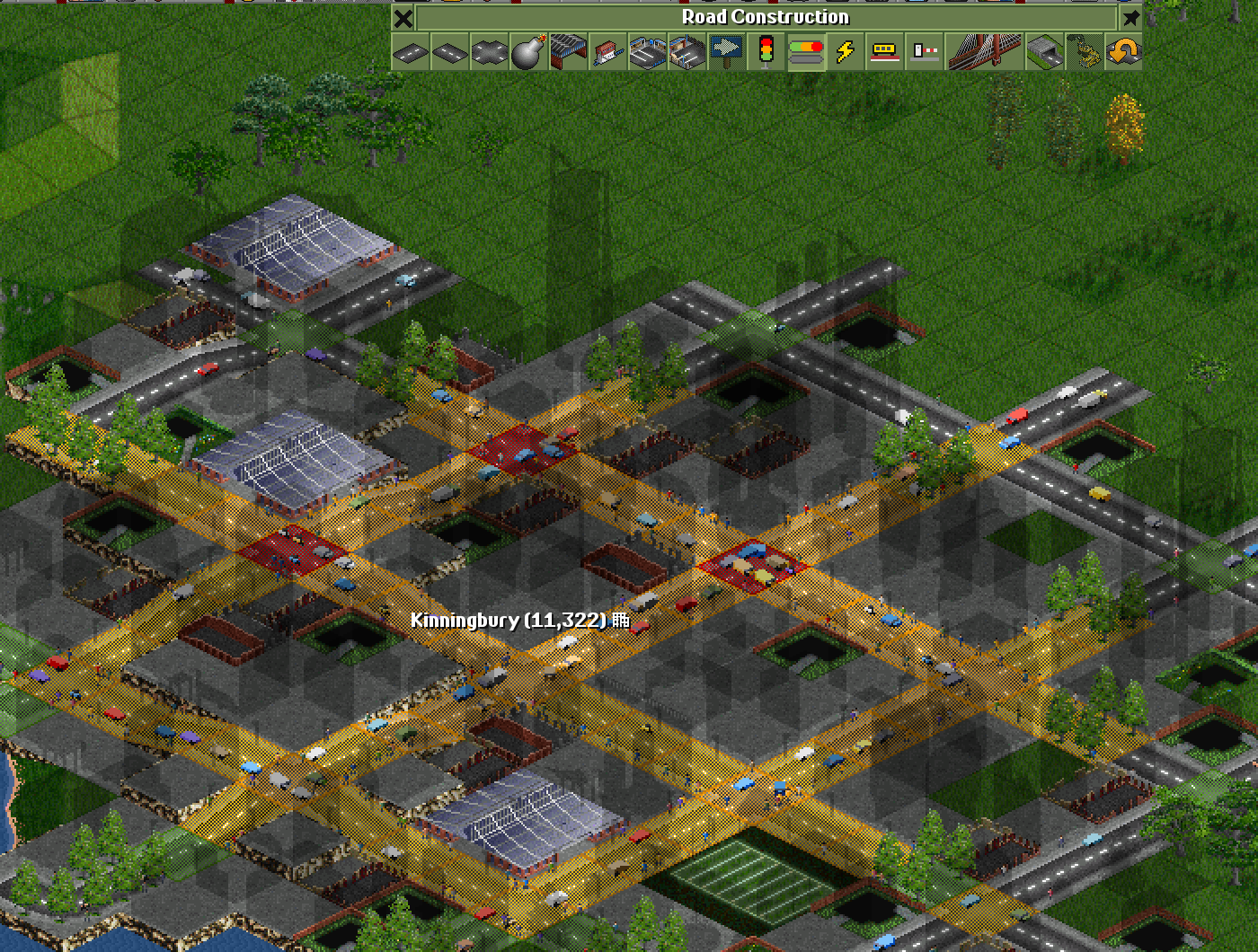
Here the corridor is the main street from the town’s edge, at the top right, through the central crossroads to the water’s edge. Junctions cross it every four tiles. Press O again to hide the overlay.
2. Build the stops
Section titled “2. Build the stops”- In the Road Construction toolbar, click the bus station button (tooltip Build bus station), or press 6.
- In the Bus Station Orientation window, click the drive-through stop that runs the same way as your street. The top-right picture is for a street from the top right to the bottom left, the bottom-right one for a street from the top left to the bottom right.
- Click the street between two junctions, about every four tiles. Each click builds a stop with its own name.
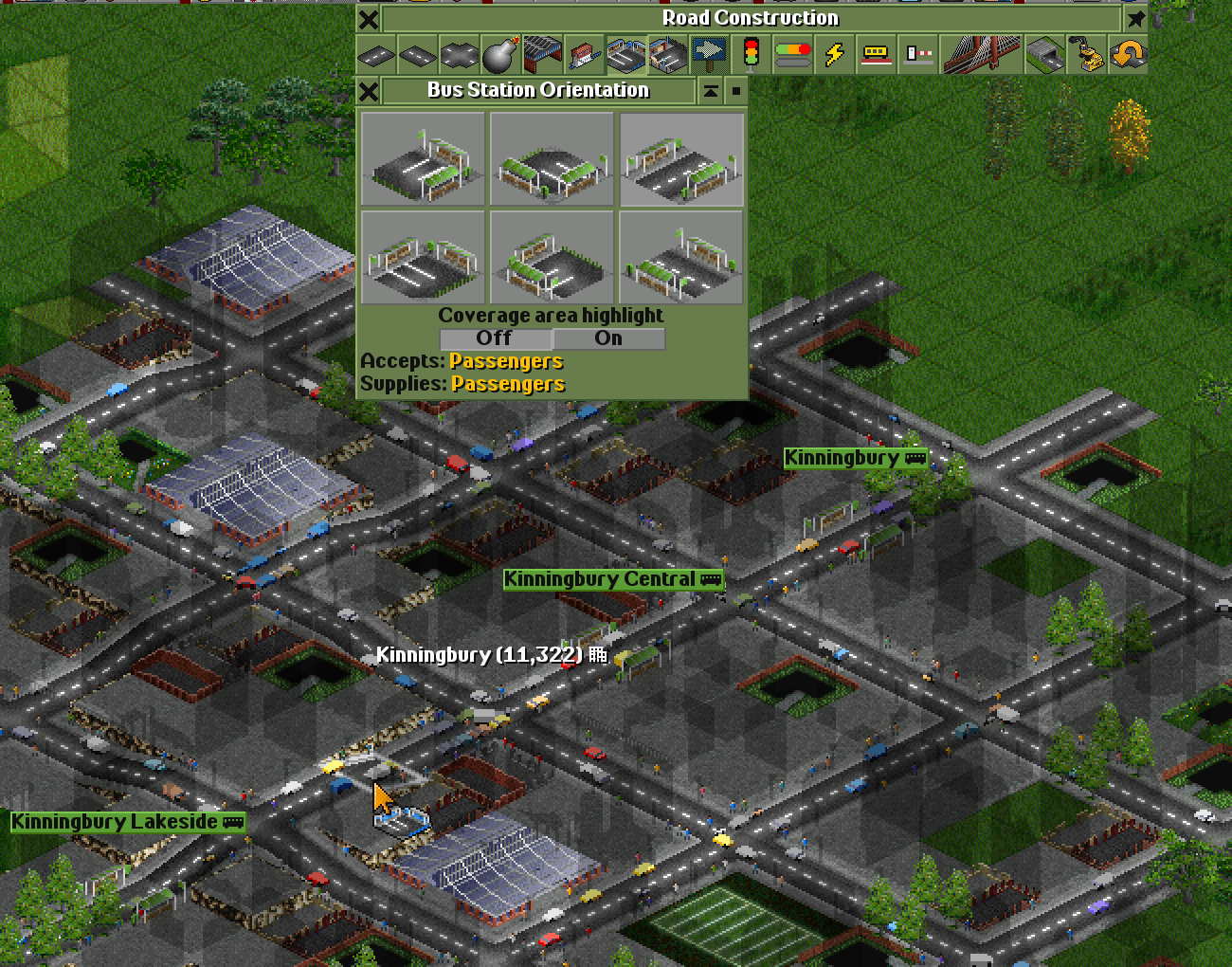
A stop needs flat land. If the game says … flat land required, the street slopes there: pick the next tile. That happened between Kinningbury Central and Kinningbury Lakeside, so this line has three stops.
3. Build a depot at one end
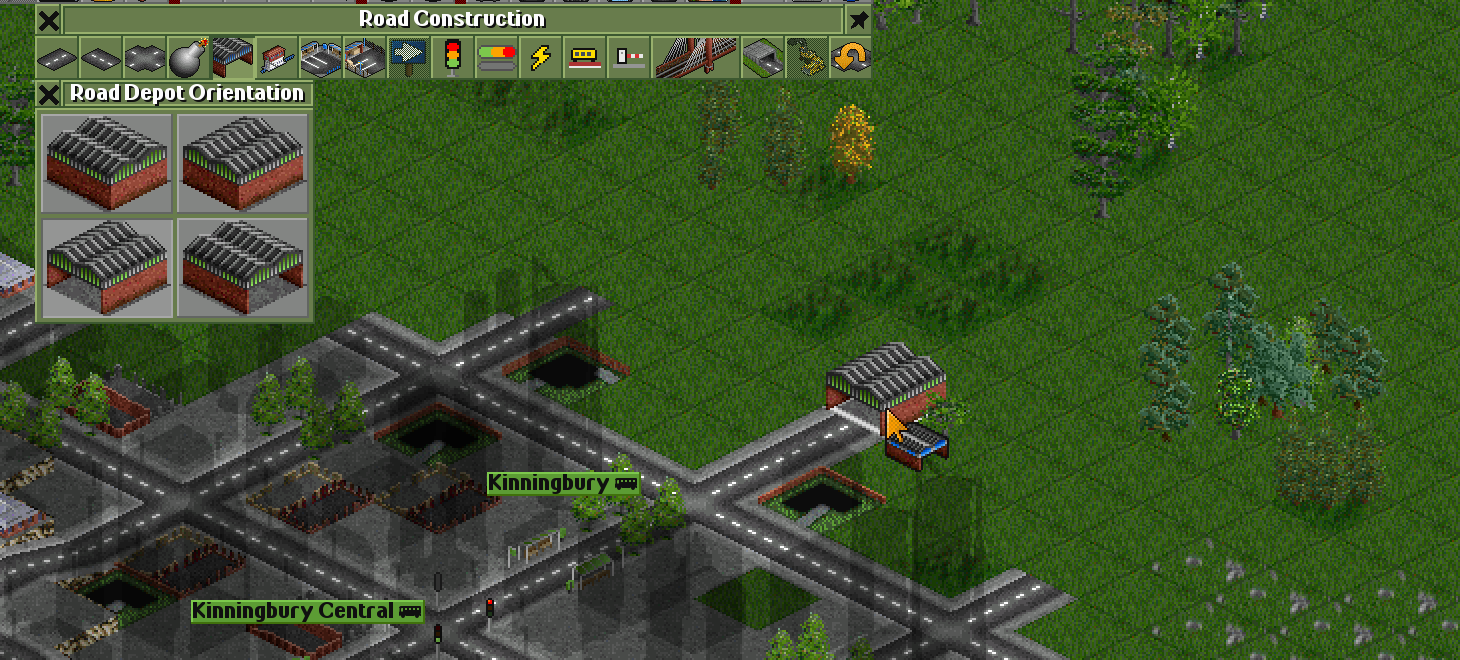
Section titled “3. Build a depot at one end”- Click the depot button (tooltip Build road vehicle depot), or press 5.
- In the Road Depot Orientation window, pick the depot whose door faces the street. The two bottom pictures have their doors at the front: bottom left for a door towards the bottom left, bottom right for one towards the bottom right.
- Click a free tile at one end of the corridor, with its door against the end of the street. The game joins the depot to the road.
4. Paint the kerbed busway
Section titled “4. Paint the kerbed busway”- Press Y in the road toolbar to open the Bus Priority toolbar (see bus priority).
- Click the busway button (a red lane between kerbs; tooltip Build a kerbed busway in the middle of the road), or press 5.
- Drag along the whole street, from the depot to the far end, over the stops and junctions.
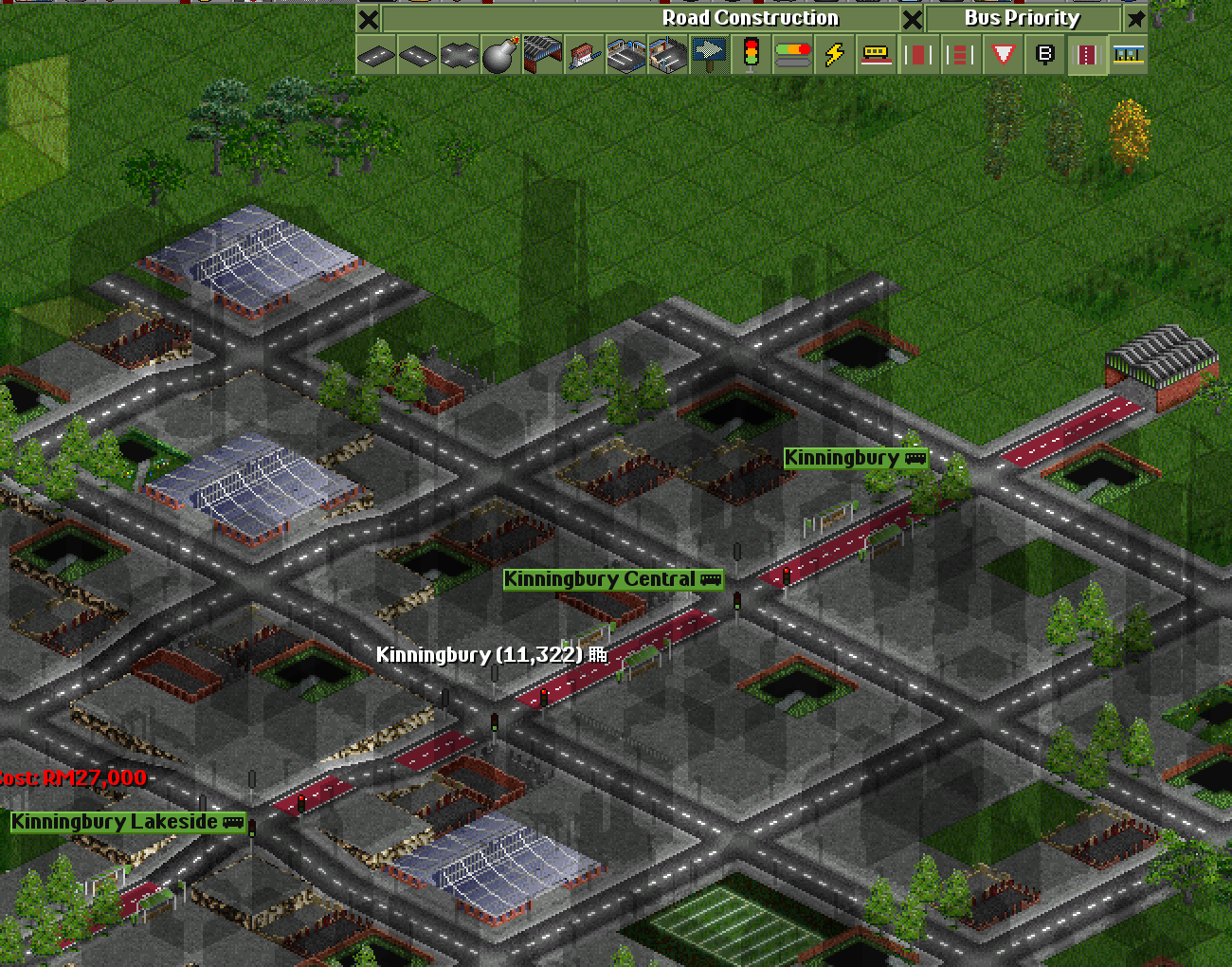
Buses on the busway drive past the town traffic, and the kerbs keep the cars out. It’s drawn on the straight stretches; the junctions have it too.
5. Make the stops BRT stations
Section titled “5. Make the stops BRT stations”- In the Bus Priority toolbar, click the BRT station button (tooltip Make a drive-through bus stop a BRT station with fare gates and level platforms), or press 6.
- Click each stop.
Each stop gets platforms with glass walls, fare gates and a roof edged in your company colour. Riders pay before they board, so buses load twice as fast, and the game’s own city buses three times as fast (see busways and BRT).
6. Put up traffic lights with bus signals
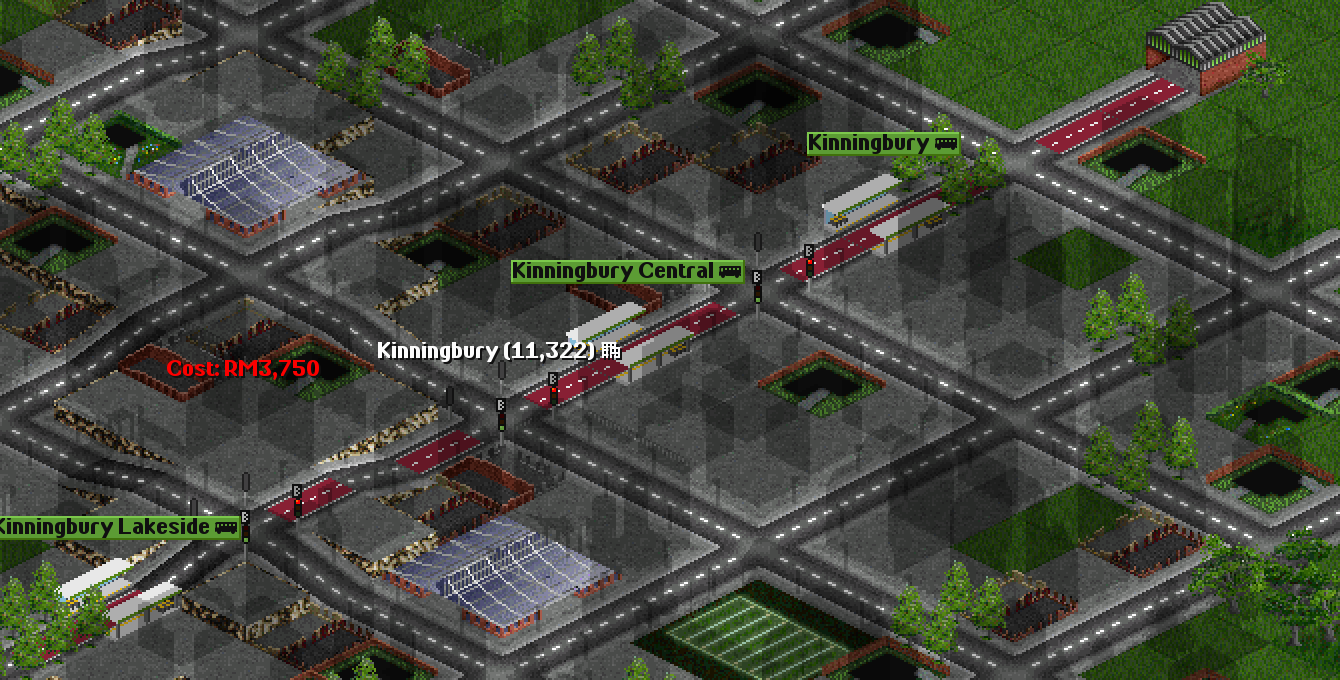
Section titled “6. Put up traffic lights with bus signals”- In the road toolbar, click the traffic light button, or press S, and click each junction between your stops (see traffic lights).
- In the Bus Priority toolbar, click the bus signal button (B; tooltip Give traffic lights bus signals), or press 4, and click the same junctions.
7. Buy buses and give them their orders
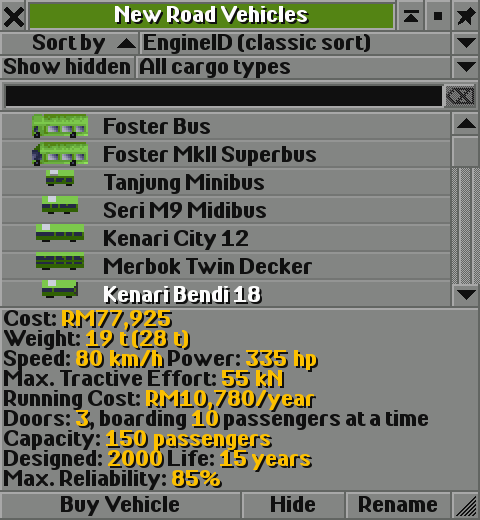
Section titled “7. Buy buses and give them their orders”- Click the depot to open its window, then click New Vehicles.
- Pick one of the game’s city buses. This line uses the Kenari Bendi 18: articulated, 150 passengers, three doors. Click Buy Vehicle. The bus’s window opens.
- In the bus’s window, click the orders button (tooltip Show vehicle’s orders).
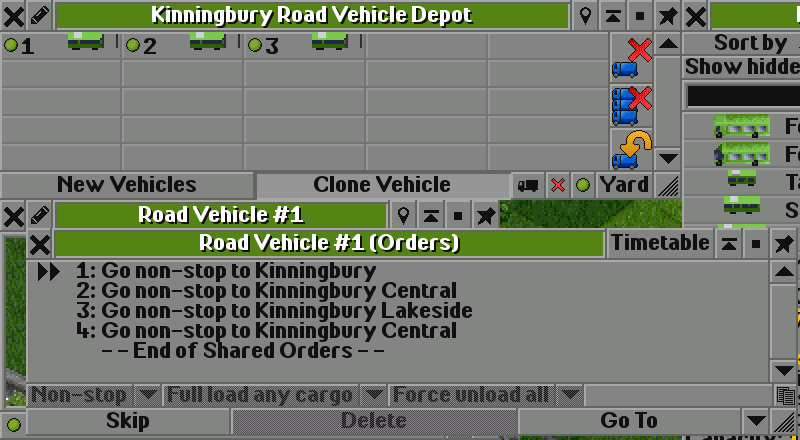
- Click Go To, then the first stop in the main view. Do the same for each stop, in order and back: Kinningbury, Kinningbury Central, Kinningbury Lakeside, Kinningbury Central. (With the setting Quick creation of vehicle orders on, Go To stays pressed between stops.)
- In the depot window, click Clone Vehicle, then Ctrl+click the bus in the depot: you get a second bus that shares its orders. Do it once more.
- Click the green start button at the bottom of the depot window (tooltip Click to start all the road vehicles inside the depot).
8. Read the BRT score
Section titled “8. Read the BRT score”Let the game run for a month or two: the score is worked out at the start of each month from what the buses did the month before.
- On the main toolbar, click Road vehicles (tooltip Open list of company’s road vehicles) and choose your company, or press Shift+F2. Set Group by to Lines (shared orders).
- Click your line. The line window opens (see lines).
- Read the two BRT lines in the middle.
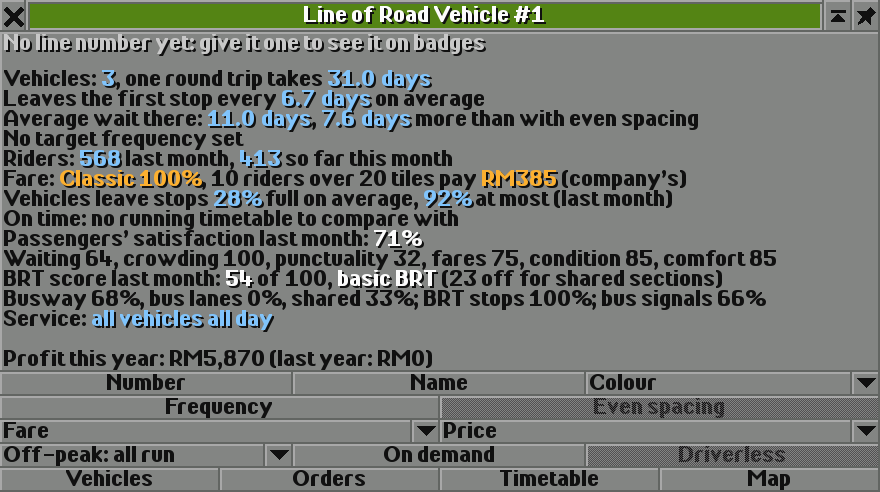
What the parts say:
- BRT stops 100%: every stop is a BRT station. Good.
- Busway 68%, shared 33%: a third of the distance the buses drive is in ordinary traffic. Everything over 10% costs a point a percent: 23 points.
- bus signals 66%: a third of the junctions the buses cross have no bus signals.
But the busway covers the whole street, and every junction between the stops has bus signals. So the buses must be driving somewhere else.
9. Find where the buses leave the busway
Section titled “9. Find where the buses leave the busway”Watch the buses where the line ends. At the depot end, after Kinningbury, the next stop is behind the bus. It doesn’t turn round on the main street: it turns into the cross street at the next junction and drives round a block of ordinary streets, through junctions without bus signals, before it comes back to the busway.
10. Fix it: end the line where the street ends
Section titled “10. Fix it: end the line where the street ends”- Build a drive-through stop on the last tile of the street, next to the depot (here it is called Kinningbury East), and make it a BRT station.
- Put traffic lights with bus signals on the junction between it and Kinningbury.
- Open the orders: in the line window, click Orders. Click order 1, click Go To and click the new stop: it goes in before order 1. Then click - - End of Shared Orders - -, click Go To and click Kinningbury. The orders are shared, so all three buses get them.
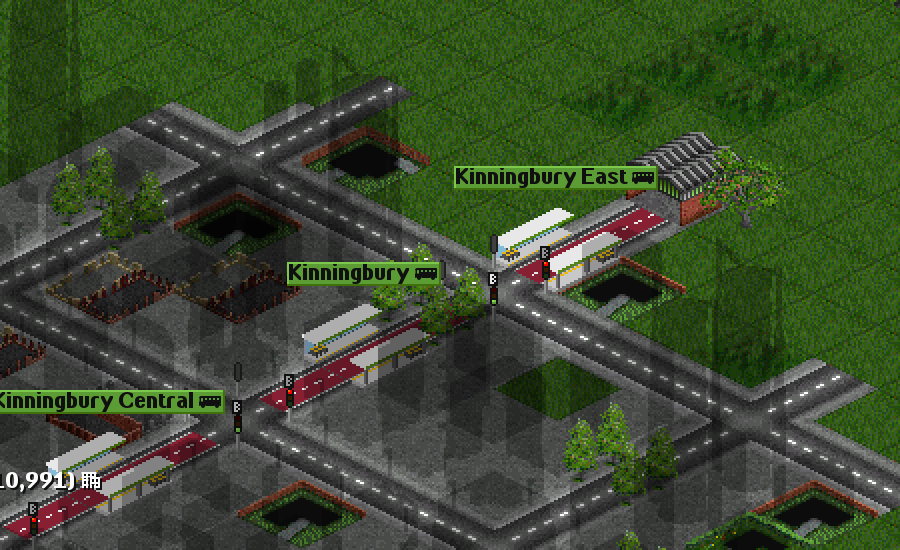
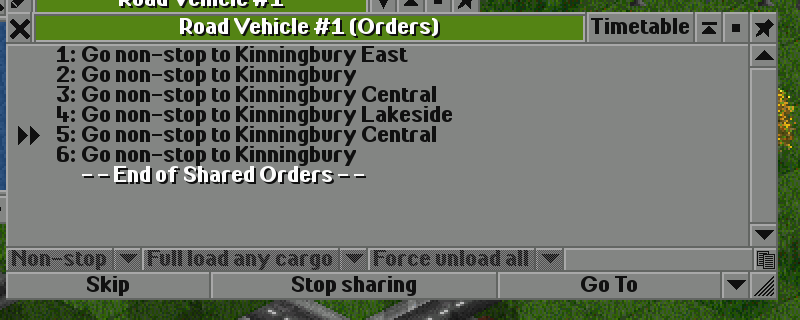
Now a bus that has stopped at Kinningbury East has only the depot ahead of it, so it turns round at the end of the street, on the busway, instead of going round the block.
11. Read the score again
Section titled “11. Read the score again”After another full month:
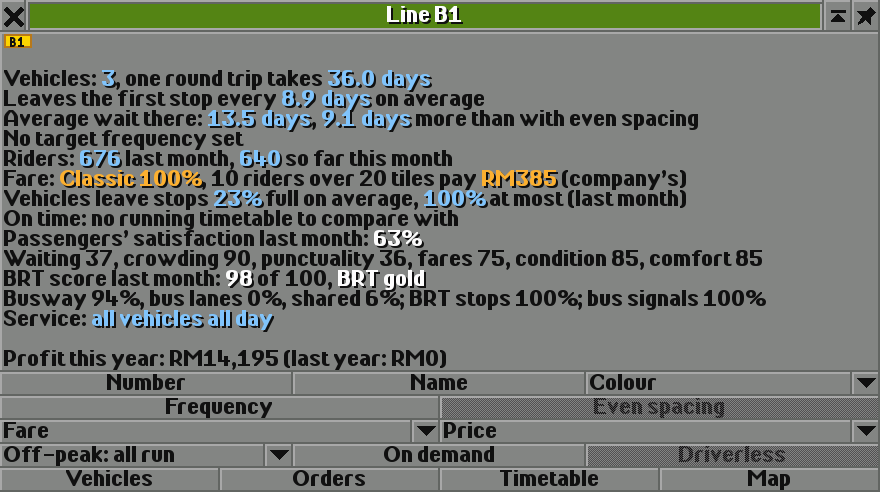
With only 6% of the distance in mixed traffic there is nothing off for shared sections, and every junction the buses cross has bus signals. As a gold BRT line it makes passengers rate all four of its stations 14% better, and a town choosing who runs a line gives it 10 extra quality points.
12. Check the traffic
Section titled “12. Check the traffic”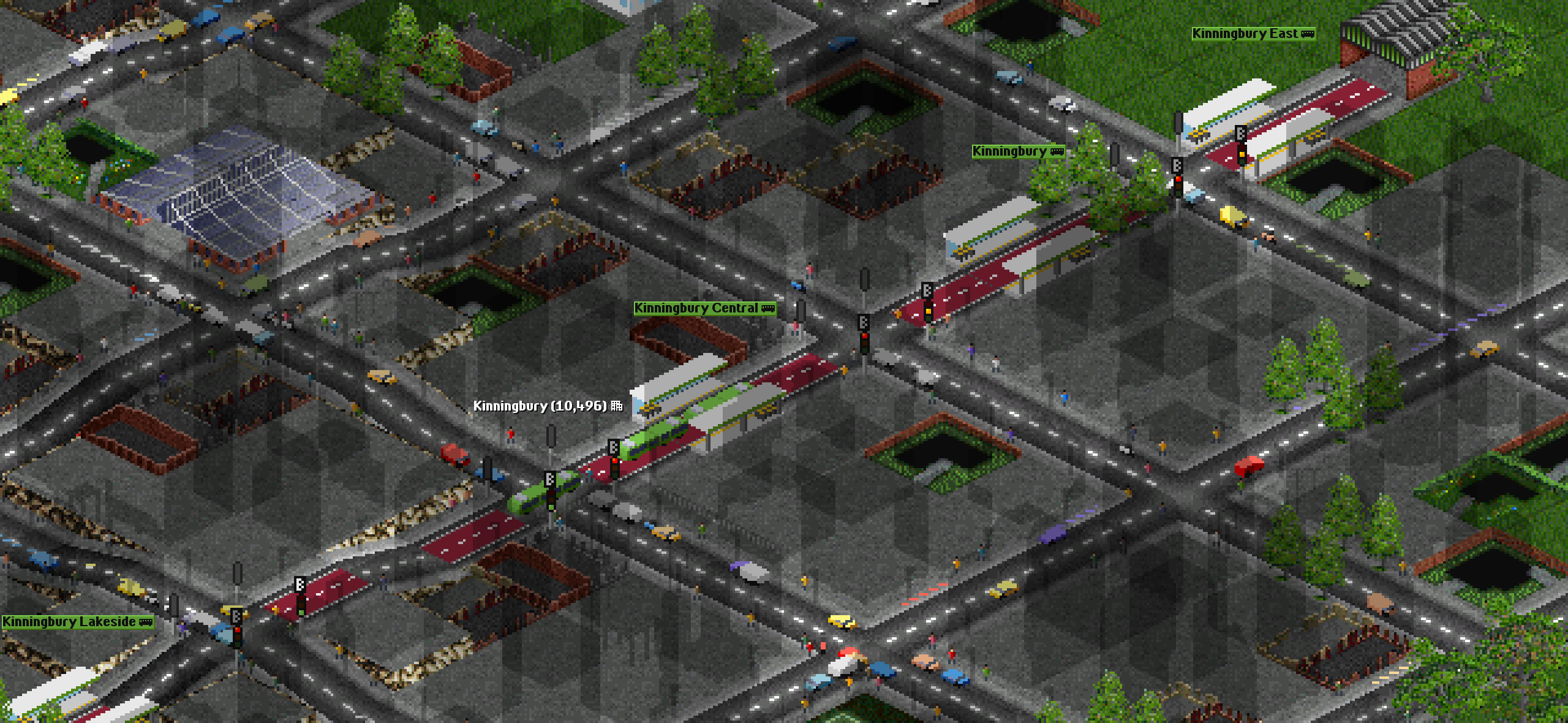
Turn the traffic overlay on again (O). The main street is still busy for the cars, yellow and orange, but your buses pass them on the busway: town traffic doesn’t slow a bus there, and the cars beside it have a lane less.
Then click the town’s name in the main view to open its window, and compare it with the same game without the line, at about the same time:
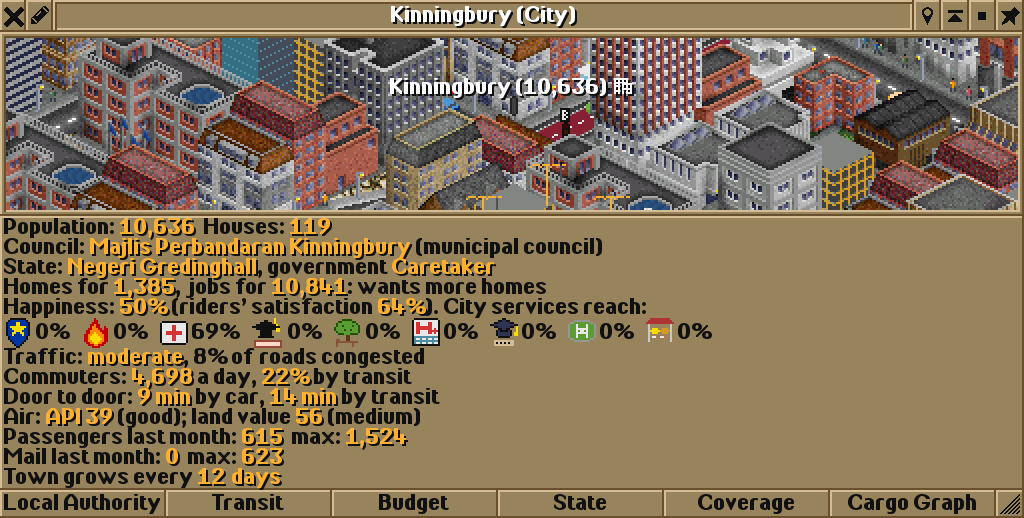
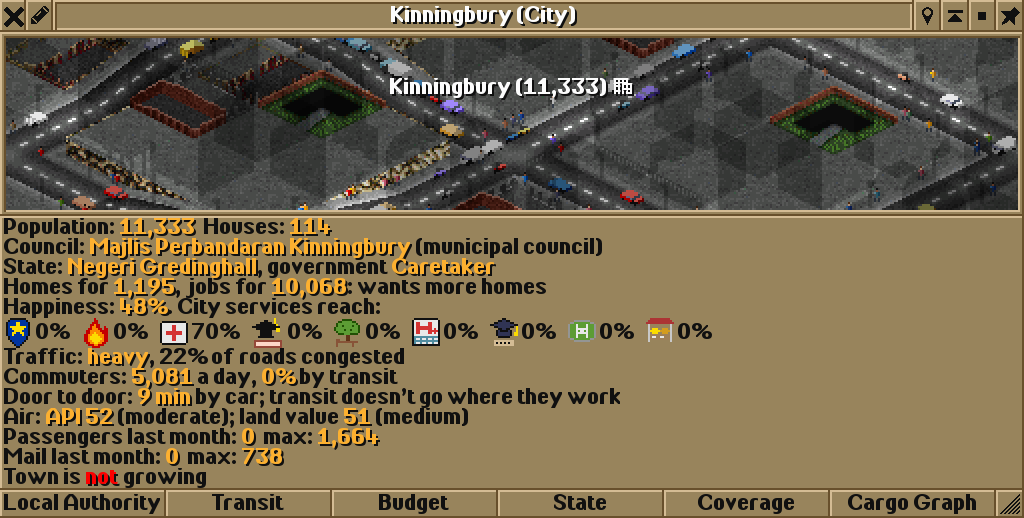
The more of a town’s passengers you carry, the fewer people drive (see commuting), so one good line took cars off streets all over town.
What next
Section titled “What next”- Add a second line that crosses the corridor at Kinningbury Central, and join stops round the central junction into one station: with six bus stops it can become a bus interchange.
- Set a target frequency and even spacing in the line window so the buses don’t bunch (see lines).
- Watch the town’s Transit window for tenders: BRT lines win more easily (see transit authorities).
See also
Section titled “See also”- Busways and BRT: the BRT score part by part
- Bus lanes and bus priority: the Bus Priority toolbar
- Traffic lights: lights and their timings
- Your first city bus network: buses, depots and orders from the start
Wira Bandar PC is a fork of OpenTTD. It is OpenTTD's code with changes, not a game made from scratch. OpenTTD is made by the OpenTTD team and contributors and is free software under theGNU General Public License version 2; Wira Bandar PC keeps that licence, OpenTTD's credits and copyright notices.Source code ·OpenTTD ·About and credits
Wira Bandar PC is not made or supported by the OpenTTD team, so please don't report its bugs to OpenTTD (see FAQ and troubleshooting).