Town traffic and street life
Wira Bandar PC is a fork of OpenTTD: OpenTTD's code with changes, free software under the GNU GPL v2. About and credits
A town’s people drive too. Instead of putting thousands of real cars on the map, the game gives every road a town traffic level from 0 to 7, and your buses and lorries feel it: on a congested road everyone crawls. The more of a town’s travel your services carry, the fewer cars there are. Street life draws that traffic: cars, vans, lorries and motorbikes on the roads, and people on the pavements.
Town traffic
Section titled “Town traffic”What makes a road busy
Section titled “What makes a road busy”The level of each road comes from:
- The homes, jobs and city services within 3 tiles. Offices and shops make a bit more traffic than homes with as many people.
- The size of the town: the same street carries more traffic in a bigger town, where cars come from further away and more of them pass through. It goes up with each doubling of the population above 500.
- How central the road is: most in the town centre, less in the suburbs, least at the edge.
- What the road can take. One-way roads take 1.6 times as much, and road types that towns don’t build houses along, such as expressways, 2.5 times. A junction takes 75%, with traffic lights 85%.
- The Town traffic setting: Light makes 60% of the normal traffic, Heavy 150%.
- Your passenger services take cars off the road (below).
- Town policies: the Congestion charge, Parking limits and Car-free centre ordinances keep cars out of the centre (see budgets and ordinances and expressways and tolls).
- Commuting, when it is on (it is by default): the homes and jobs around a road make half as much traffic, and the commuters’ cars add theirs along the routes they drive, also between towns. See commuting.
Town traffic stays off bus-only roads. With normal traffic, a town of 10,000 people has most of its roads at levels 1 and 2, a tenth of them at 4 or more, and its busiest spots at 5 or 6. Towns under 3,000 people stay at 0 or 1; cities of 50,000 and more see 6 and 7.
A road’s level moves up to two steps a time towards what its traffic calls for, about once a week. It is part of the map, so it is saved and the same for every player in a network game.
What it does to your vehicles
Section titled “What it does to your vehicles”From level 2, every road vehicle on the road, trams too where they share it, goes no faster than:
| Level | Top speed | On the traffic map |
|---|---|---|
| 0 | no limit (flows freely) | Quiet road |
| 1 | no limit (flows freely) | Traffic flows (green) |
| 2 | 70 km/h | Some waiting (yellow) |
| 3 | 55 km/h | Some waiting (yellow) |
| 4 | 42 km/h | Slow traffic (orange) |
| 5 | 32 km/h | Slow traffic (orange) |
| 6 | 22 km/h | Traffic jam (red) |
| 7 | 14 km/h | Traffic jam (red) |
The road pathfinder counts a congested road as longer, from a tenth of a tile extra at level 2 to almost two tiles at level 7, so vehicles drive around congestion where there is another way. Buses on bus lanes and busways pass the town traffic. With the city clock on, roads are a level busier in the rush hours, a level quieter in the evening and two at night. Busy roads also pollute the air, and smart traffic lights switch for town traffic too.
Carry passengers, take cars off the road
Section titled “Carry passengers, take cars off the road”The bigger the share of a town’s passengers that were carried last month, the fewer cars: up to 60% fewer when all of them ride. An integrated transport hub counts for a quarter more. With commuting, it’s the share of commuters who take transit instead, and at least as many take it as your share of the town’s passengers says.
Where you see it
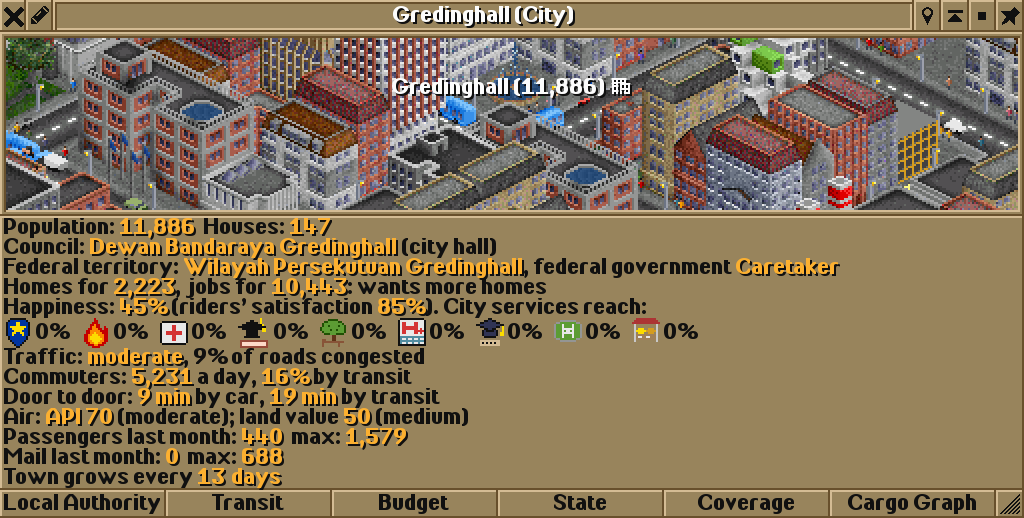
Section titled “Where you see it”- The town window: click a town’s name in the main view. The line Traffic: says how bad it is and how many of the town’s roads are congested (level 4 or more): light, moderate when any road is congested or reaches level 2, heavy from 10% congested, very heavy from 25%. Below it, with commuting, the commuters and their door-to-door times; without commuting, Your services take …% of cars off the road.
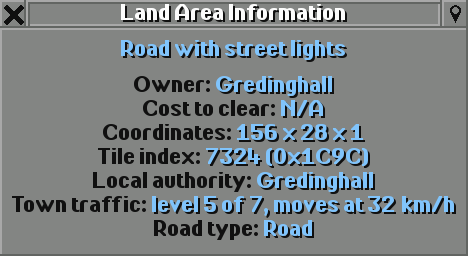
- Land Area Information: on the main toolbar, click Help (the question mark; tooltip Open land information, screenshot menu, credits, or developer tools), choose Land area information and click a road. It says, for example, Town traffic: level 5 of 7, moves at 32 km/h.
- The traffic map and overlay colour roads by it, or by the delays of road vehicles there when those are worse.
Street life
Section titled “Street life”Street life draws the town traffic in the views you look at:
- Vehicles: cars, vans, small lorries and motorbikes, in many colours, mostly white, grey and dark ones. There are as many as each road’s level calls for: about one on every three tiles of a quiet town street, up to three or four a tile on a jammed one, fewer on the outskirts and in the countryside.
- They drive in lanes on the side the game drives on, go straight on more often than they turn and prefer busier roads. They turn around at dead ends, bridges, tunnels, depots and bay stops, and pass through drive-through stops and level crossings. They keep their distance, queue behind buses and lorries, stop at red lights and closed level crossings, and go no faster than the road and its town traffic allow. Knots at junctions untangle after a moment. They stay off bus-only roads and kerbed busways.
- People walk the pavements of town roads, the ones with paved sidewalks, street lights or trees: about three a tile in the centre, fewer in the suburbs. They keep to one side, follow the pavement round corners, cross side streets at junctions, turn back where the pavement ends, and now and then go into a building.
- Crowds wait at bus stops: one person for every 8 passengers waiting at the station, shared over its bus stops, at most 8 on a stop tile. On railway platforms up to 12 people stand on a tile when it is full.
Street life is only drawn. It doesn’t slow anything down (the town traffic level does that), it isn’t saved, and every player’s game makes its own, so network games stay in step. It shows in the four closest of the six zoom levels; zoom out further and it disappears. When you open a view, its roads fill at once; after that, new vehicles mostly come in from the edges and vanish when they leave the view.
- To ease a congested town, carry more of its passengers: every share of them you carry takes cars off all of its roads, not just the ones your buses use.
- Keep buses off the worst streets with bus lanes or busways, or route them along quieter parallel roads.
- One-way pairs carry more town traffic than two-way streets; expressways carry the most.
- If scrolling feels slow on an older computer, set Street life to Vehicles or Off. It only changes what you see.
Switching it off
Section titled “Switching it off”SettingTown traffic
Main toolbar: Options and settings (the gear) → Game options → Advanced tab → Environment → Towns. Or type its name in the Filter box.
Choices: Off, Light, Normal, Heavy. Default: Normal. Choose Off for the game as in OpenTTD.
With Off, roads stop congesting: their levels fall back to 0 within about a month. Smart traffic lights then only react to real vehicles, commuting stops (it needs town traffic), roads no longer pollute, and the town window and land information drop their traffic lines. Street life still shows a few cars, as on a quiet road.
For experts, how much the pathfinder avoids congestion is a number in openttd.cfg:
openttd.cfg[pf] yapf.road_congestion_penalty
Not in the settings window: set it in Documents\Wira Bandar\openttd.cfg while the game is closed (for new games), or in a running game with the console command setting pf.yapf.road_congestion_penalty <value>. Default: 100. See the settings reference.
How much the road pathfinder avoids congested roads, in percent. The default, 100, is as described above; 0 ignores congestion when choosing a route (vehicles still slow down on it).
Street life has its own setting. Off only stops the drawing: the town traffic and its effects stay.
SettingStreet life
Main toolbar: Options and settings (the gear) → Game options → Advanced tab → Interface → Viewports. Or type its name in the Filter box.
Choices: Off, Vehicles, Vehicles and people. Default: Vehicles and people. Choose Off for the game as in OpenTTD. It only changes what you see, not the game, and is not stored in saves.
See also
Section titled “See also”- The traffic map and overlay
- Traffic lights and giving way
- Commuting: where town traffic comes from when commuting is on
- Bus priority: bus lanes past town traffic
- Air pollution and land value: what congested roads do to the air
Wira Bandar PC is a fork of OpenTTD. It is OpenTTD's code with changes, not a game made from scratch. OpenTTD is made by the OpenTTD team and contributors and is free software under theGNU General Public License version 2; Wira Bandar PC keeps that licence, OpenTTD's credits and copyright notices.Source code ·OpenTTD ·About and credits
Wira Bandar PC is not made or supported by the OpenTTD team, so please don't report its bugs to OpenTTD (see FAQ and troubleshooting).