Metro and rail
Wira Bandar PC is a fork of OpenTTD: OpenTTD's code with changes, free software under the GNU GPL v2. About and credits
Wira Bandar PC adds four pieces for running trains like a metro: a map of each line like the one above the doors of a metro train, railway platforms that fill up with people, platform screen doors, and driverless lines like Singapore’s North East Line or Kuala Lumpur’s Kelana Jaya Line. Towns with a railway station also ask now and then for a feeder bus to it. The line map works for any line; crowding, doors and driverless running are about railway stations and trains.
Open a line map
Section titled “Open a line map”- Open the line’s window (see lines): in a vehicle’s Timetable window click Line, or in a vehicle list set Group by to Lines (shared orders) and click the line.
- In the bottom row, click Map (after Timetable).
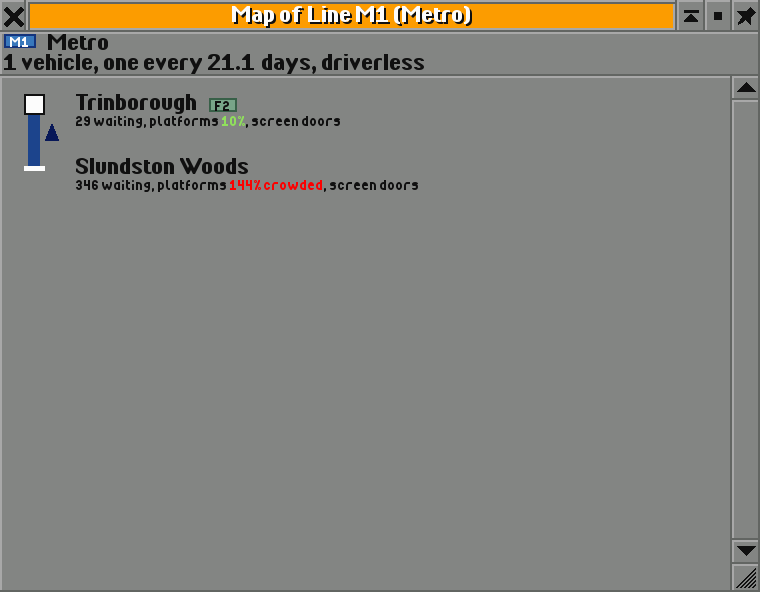
- The stops run from top to bottom in the line’s colour. A line that goes out and comes back the same way (stops A B C D C B) shows each stop once. Any other line is drawn as a loop that ends in a dashed stretch and Back to its first stop.
- Under each stop: how many passengers wait, and at railway stations how full the platforms are (in red when crowded) and whether they have screen doors.
- A stop where other passenger lines stop too gets a ring and those lines’ badges, so you see where to change.
- The vehicles are arrows beside the line: on the left on their way down, on the right on their way back, placed by how far into each trip they are. The map refreshes twice a second.
- Click a stop to scroll the main view to it, Ctrl+click to open its station. Click a vehicle to open it, Ctrl+click for its line.
Crowded platforms
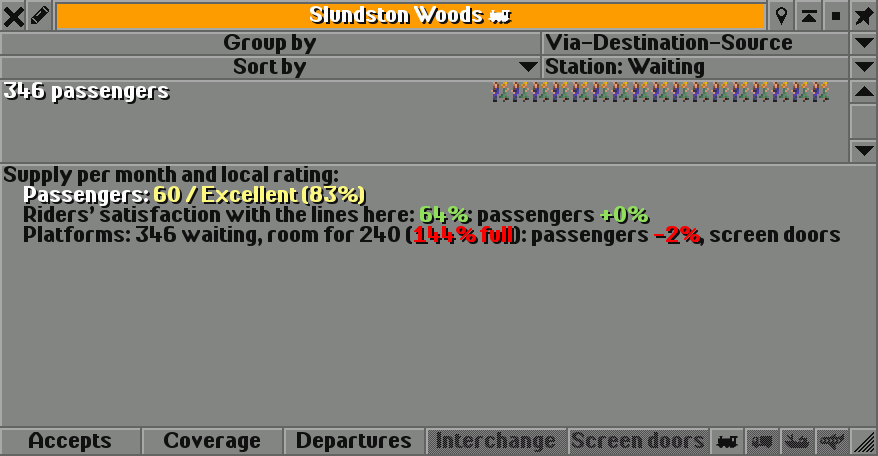
Section titled “Crowded platforms”Railway platforms hold 120 passengers a tile, plus 30 for each bus or tram stop of the same station. Above that they are crowded:
| What | Without screen doors | With screen doors |
|---|---|---|
| Trains loading and unloading | 1% slower for every 4% over, at most 30% | not slowed |
| Passenger rating | 1% lower for every 8% or so over, at most 16% (at 220% full) | half that |
| Riders’ satisfaction, crowding part | the worse of crowded vehicles and crowded platforms: fine up to 70% full, a point less for each percent above | the same |
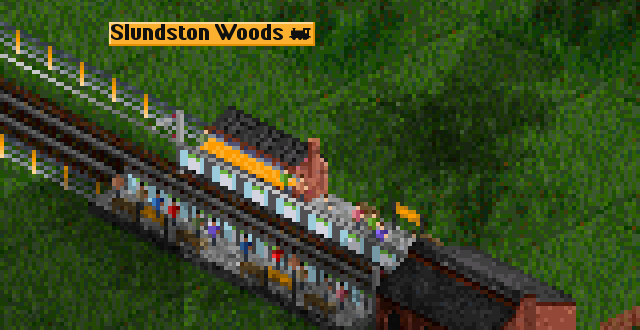
The game follows how crowded the platforms were over the last ten days or so. Stations without railway platforms aren’t affected: bus stops keep their street-side crowds. In the main view people stand on the platforms, up to 12 a tile when they are full (with street life set to Vehicles and people, see street life).
The station window’s ratings view (click Ratings) shows the platforms:
Fit platform screen doors
Section titled “Fit platform screen doors”- Open the station’s window: click the station in the main view, or use the Stations list.
- In the bottom row, click Screen doors (after Interchange). The button only shows at stations with railway platforms.
The doors go along the edges of all the station’s platforms: glass, half height as on elevated MRT stations, with a green light over each door. They cost an amount for each platform tile and add a yearly upkeep for each. When its transit budget allows, the town pays half, as for interchanges.
With screen doors, crowds no longer slow boarding, crowding counts half for the passenger rating, and the station counts towards a driverless line.
In a test, one 40-seat train ran between two stations with room for 240 passengers each, with rush hours on. Without doors its platforms ended the year 320% to 340% full, passengers rated the stations 59% and the line carried 920 riders. With doors: 64% and 1,040 riders. With doors and driverless trains, whose doors board faster, the platforms ended at 160% to 195%, the rating rose to 70% and the line carried 1,102 riders.
Run a line without drivers
Section titled “Run a line without drivers”- Open the train line’s window.
- Read the Trains: line. It says what is still missing, for example Trains: with drivers; driverless needs screen doors at every stop (1 of 2 have them), or Trains: with drivers; could run driverless with the cost of fitting the trains.
- Click Driverless (next to On demand). The trains are fitted, and the line says Trains: driverless, running costs -20%, boarding +10%.
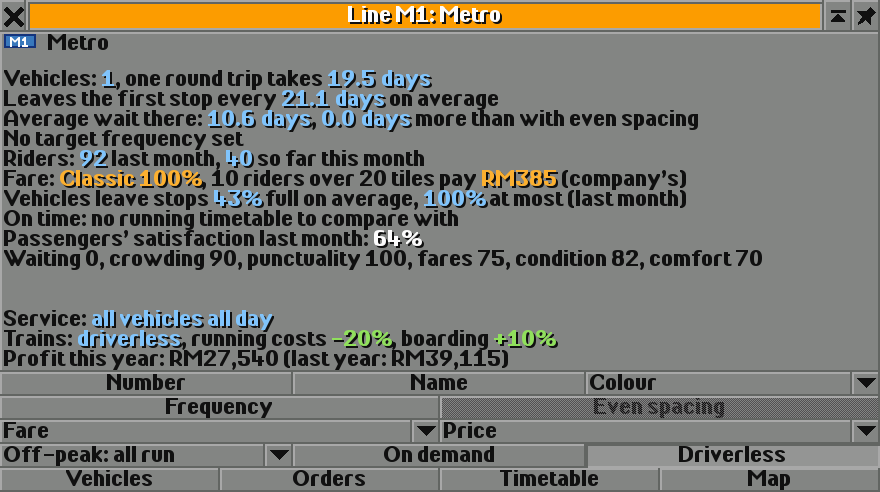
A line can run driverless when:
- all its trains have electric engines (electric, monorail or maglev),
- every station a passenger line stops at has screen doors, and
- its trains crossed no road at a level crossing this month or last month.
Fitting the trains costs a fifth of the price of their engines. A driverless train that drives onto a level crossing gets its drivers back at once, with a message (The line of … runs with drivers again: its trains cross a road at a level crossing). So does a line that buys a train without electric engines or stops at a station without doors; that is checked each month.
Feeder buses for railway stations
Section titled “Feeder buses for railway stations”Now and then, a town with a railway station that passenger trains stopped at last month asks for a feeder bus between the station and houses 8 to 24 tiles away that no stop reaches, as Rapid KL runs feeder buses to its MRT. It asks only if its transit budget can pay for a year of it, with a 1 in 6 chance a month and at most every 18 months. The news says roughly how much a month it offers, for five years, to the first company whose bus line links the station and the houses within a year.
- Open the town’s window and click Transit. The request shows as Feeder wanted: … to houses … tiles away, open until …. Select it and click Line to see the houses.
- Build a bus stop at the station or within 4 tiles of it, and one within reach of the houses.
- Run a bus line between them that leaves its first stop at least 4 times a month.
- At the end of the month the town signs a feeder contract with the busiest line that does this.
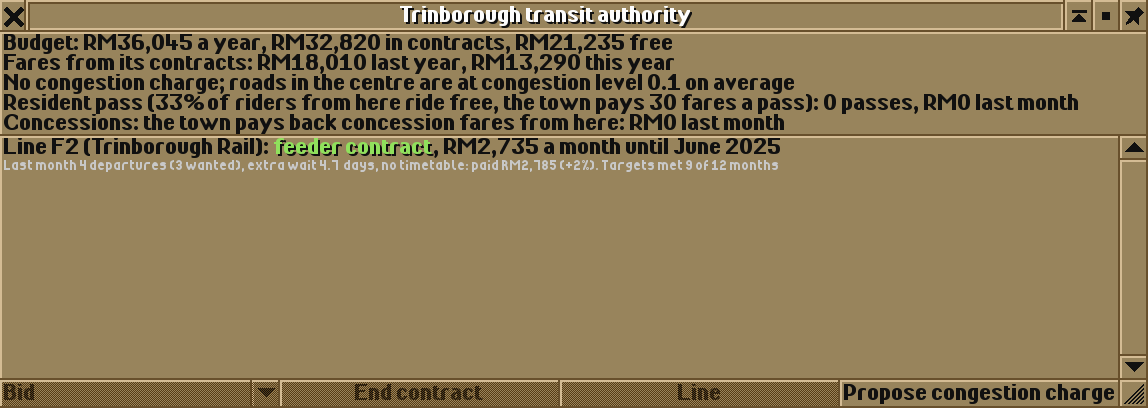
The contract pays the line’s costs plus 20% a month for five years, the town keeps the fares, and the town pays by departures, with the same targets, reviews and extensions as its other contracts (see transit authorities). It ends if the line stops linking the station and the houses. A request nobody takes up ends after a year.
- Longer platforms hold more people: each tile adds 120 places. Bus stops in the same station add 30 each.
- Fit screen doors first where the line map shows red, then go driverless once every stop has them.
- Plan driverless lines with bridges or tunnels where they cross roads: one level crossing ends driverless running.
- With the city clock on, platforms fill up most in the rush hours.
Switching it off
Section titled “Switching it off”There is nothing to switch off. The line map is only a window; screen doors and driverless running are there only where you choose them; platform crowding applies to every station with railway platforms; and towns only ask for feeders when passenger trains stop in them.
See also
Section titled “See also”- Lines: the line window
- Interchanges and hubs: bus interchanges at railway stations
- Passenger satisfaction: how crowding feeds riders’ satisfaction
- Transit authorities: contracts and the town’s transit budget
Wira Bandar PC is a fork of OpenTTD. It is OpenTTD's code with changes, not a game made from scratch. OpenTTD is made by the OpenTTD team and contributors and is free software under theGNU General Public License version 2; Wira Bandar PC keeps that licence, OpenTTD's credits and copyright notices.Source code ·OpenTTD ·About and credits
Wira Bandar PC is not made or supported by the OpenTTD team, so please don't report its bugs to OpenTTD (see FAQ and troubleshooting).